
Disk Volumes
Disk Volumes gives you complete control over the persistent storage attached to your virtual machines. List volumes from any cloud account, then create, modify, encrypt, attach, detach, snapshot, or delete them — all without leaving QuickInfra.
What is Disk Volumes?
Disk Volumes is the storage management layer of QuickInfra. It surfaces all EBS volumes across your cloud accounts in a unified list, and gives you a rich set of actions to manage their full lifecycle — from initial creation through encryption, resizing, attachment to instances, snapshotting for backup, and eventual deletion.
Whether you need to provision fresh storage for a new server, resize an existing volume as your data grows, or take a point-in-time snapshot before a risky deployment, Disk Volumes handles it all through a single action interface. Select an action, configure the parameters, and execute — QuickInfra handles the API calls to your cloud provider.
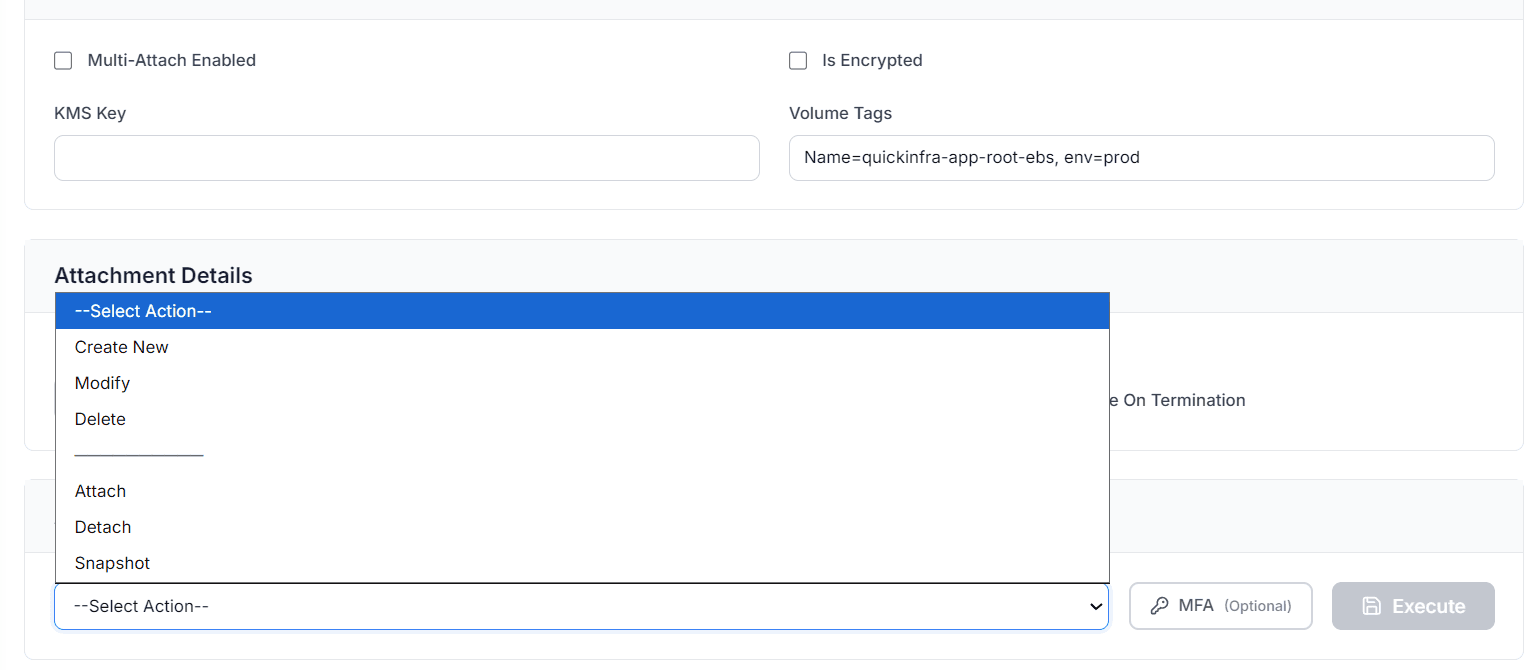
How to Manage Your Volumes
Available Actions
- Create New — Provision a brand new EBS volume. Specify the size, volume type, availability zone, and whether it should be encrypted. You can also enable Multi-Attach for volumes that need to be shared across multiple instances simultaneously.
- Modify — Resize an existing volume or change its type without detaching it from the instance. Useful for scaling storage live as your application grows.
- Delete — Permanently remove the volume from your cloud account. The volume must be detached before deletion.
- Attach — Connect an existing volume to a running or stopped instance. Specify the target instance and the device path for the attachment.
- Detach — Safely disconnect a volume from its current instance without destroying the data. The volume becomes available for reattachment elsewhere.
- Snapshot — Create a point-in-time backup of the volume. Snapshots are stored in your cloud account and can be used to restore data or create new volumes from a known good state.
Encryption
When creating a new volume, you can enable encryption by checking Is Encrypted. Provide a KMS Key ARN if your organisation manages its own encryption keys — leave it blank to use the default AWS-managed key. Encrypted volumes protect data at rest and in transit between the volume and the instance.
Key Things to Know
- A volume must be in the same availability zone as the instance you want to attach it to.
- Modifying a volume (resize or type change) takes effect immediately but may require a file system extension inside the OS to use the new space.
- Snapshots are incremental — only changed blocks are stored after the first snapshot, keeping backup costs low.
- Multi-Attach is supported only for io1 and io2 volume types and requires a cluster-aware file system on the attached instances.
- Volumes set to Delete on Termination will be automatically removed when the attached instance is terminated — ensure this is intentional before enabling it.