
Networks
Networks gives you a complete view of all Virtual Private Cloud networks across your cloud accounts. Drill into any VPC to inspect its configuration, explore all subnets beneath it, and see every virtual machine running inside it — all without touching your cloud console.
What is Networks?
A Virtual Private Cloud is the foundational network layer on which all your cloud infrastructure runs. Every VM instance, subnet, and load balancer lives inside a VPC. The Networks section in QuickInfra surfaces all VPCs across your cloud accounts in a clean list, giving you immediate visibility into your network topology — CIDR blocks, tenancy settings, default status, and availability state — without needing direct access to your cloud console.
Beyond simply listing networks, you can drill into any VPC to view its full configuration, see all subnets defined within it, and list every virtual machine instance currently running or stopped under that network. This makes Networks the ideal starting point for understanding how your infrastructure is organised and where your workloads are deployed.
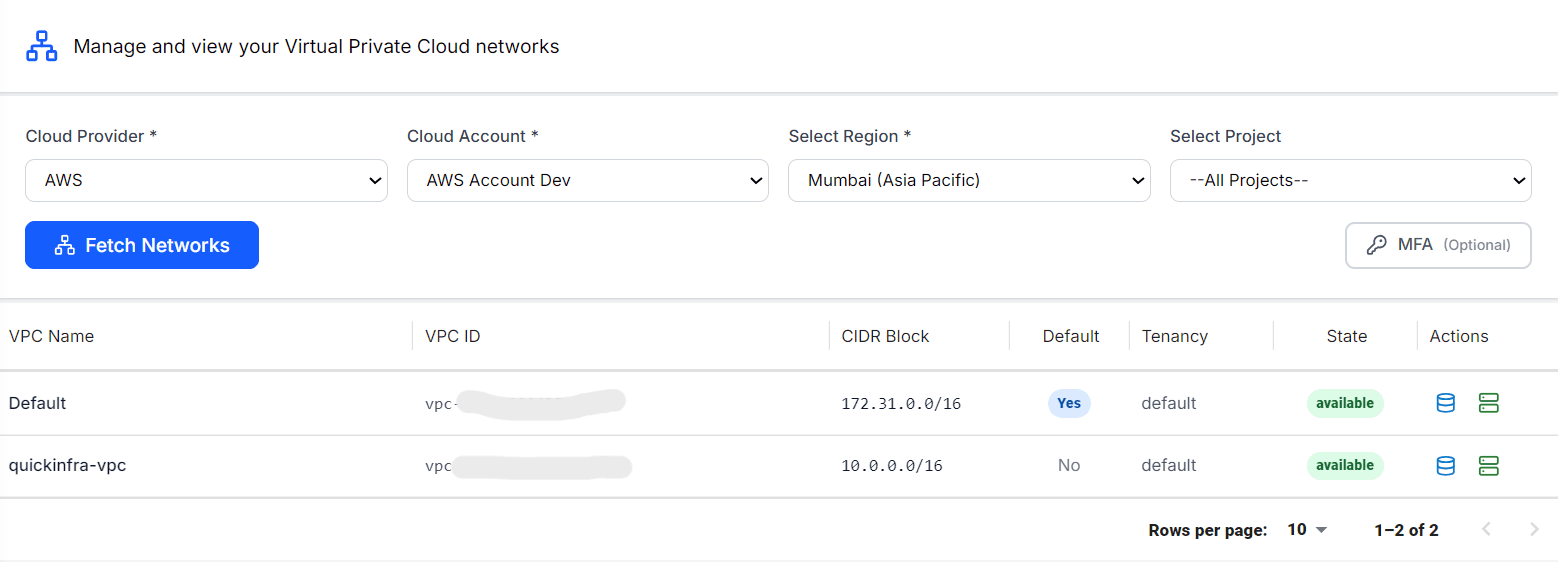
How to View Your Networks
What You Can See Per Network
- Network Configuration — Full details of the VPC including CIDR block, DNS settings, tenancy model, and associated route tables and internet gateways.
- Subnets — All subnets defined within the VPC, their availability zones, CIDR ranges, and whether they are public or private. This is the same data available in the dedicated Subnets section, surfaced here in context for quick navigation.
- VM Instances — Every virtual machine currently running or stopped inside the VPC, with instance type, IP addresses, and state — giving you a complete picture of what is deployed in that network.
Key Things to Know
- Every AWS account comes with a Default VPC in each region. It is safe to use for development but it is recommended to create a dedicated VPC for production workloads.
- The CIDR block of a VPC defines the private IP address range available to all resources inside it — this cannot be changed after creation.
- QuickInfra does not create or modify VPCs from this screen. Network provisioning happens through Infrastructure Projects using Terraform or CloudFormation templates.
- If a VPC shows as available but no instances appear under it, the VPC exists but no compute resources have been deployed into it yet.